Tag: Salesforce

  • 7 tips for increasing Salesforce User Adoption

    7 tips for increasing Salesforce User Adoption

    Without user adoption, any software is rendered to nothing more than a fancy screensaver. If your organisation is struggling with employee adoption, user error and user experience with Salesforce, we have some suggestions to make the most out of your investment. Here are our top tips to increase user adoption and experience with Salesforce:

    1. Consulting your stakeholders

    Ideally, this stage is completed before implementing any new software, process or major transformative activity. Stakeholders determine the success of a business, and without their support you may not be able to unlock all benefits Salesforce has to offer. We recommend holding a workshop with your stakeholders prior to implementation to openly discuss concerns and design a roadmap. Once your stakeholders realise how much easier Salesforce can make their working week – adoption rates will soar!

    1. Training

    Your colleagues may be excited by the functionality of their new CRM, but without the correct skills and experience, new users can quickly get lost and frustrated. Thorough training is a must for fostering excellent user experience – and it is a win-win. Skilled users will be able to manage, improve and adapt your system for all your business needs. If you don’t have the necessary knowledge, there are many training options offered by certified third party consultancies and, of course, Salesforce’s trusty (and free!) learning platform – Trailhead.

    1. Configuration

    Once you have sourced or upskilled your Salesforce resource and your users have spent time interacting with the new CRM, it is a good idea to take a look at how Salesforce is being utilised day-to-day by your workforce. Are certain vital fields being ignored or is information being entered improperly? You can configure objects in your org to guide and assist your users, adding compulsory fields to alert for errors, dropdowns to encourage correct data entry or defaults that make life easier for your colleagues. You can completely customise Salesforce to your business and your users, and this is a surefire way to boost adoption and engagement.

    1. Onboarding

    Organisations with a strong onboarding process improve new hire retention by up to 82 percent. Businesses can often fail new employees in their first few weeks by not providing all the tools necessary for them to succeed – and this includes training on their various tools and applications! Weave Salesforce training into your onboarding plan with guided sessions, 1-2-1 training and Trailhead modules.

    1. Strategy

    We have already mentioned designing a roadmap with your stakeholders, which is great for the initial implementation. Building Salesforce into your strategy doesn’t just fix your immediate issues and align your processes, it also sets you on a path to grow and improve your organisation. Perhaps you are a charity wishing to increase regular donors or a property leasing company who wants to reduce admin burdens and boost productivity – Salesforce can underpin any strategic or transformational changes to ensure that these changes are successful and scalable.

    1. User adoption tools

    If you have already tried following our first five tips to no avail, perhaps your organisation is too large to quickly make these adjustments and improve your user adoption in this way. There are a number of brilliant solutions available on the Salesforce AppExchange, for example, one of our partner organisations, Apty, allows companies to create a custom layer of guided assistance for users. This can be as objective as you wish, and it means new employees can benefit from Salesforce within their first few hours on the job.

    1. Salesforce Partners

    These solutions all sound great – if you have the time and resources to make the changes. If your struggle with user adoption is negatively impacting your business, perhaps you could consider reaching out to a registered Salesforce Consultancy such as Performa IT who can accelerate your user adoption and employee satisfaction efficiently and effectively.

    For more information, email hello@performa-it.co.uk or give us a call on 01453 703230.

  • 5 things you need when starting off with Salesforce

    5 things you need when starting off with Salesforce

    So you’ve made the exciting decision to invest in the world’s leading CRM. The question is – how do you make Salesforce work for you? Any software has an initial expense, and the faster you see your return on investment, the better!

    There are 5 main pillars to a smooth and successful Salesforce implementation:

    1. Planning

    It is essential to outline your ambitions for your Salesforce org prior to implementation. Like a set of lego, there are unlimited possibilities with the software. A comprehensive roadmap will help you reach your initial set of goals quickly and set you up for continued success.

    1. Commitment

    A commitment to creating the best Salesforce system for your business is vital for all stakeholders, and this should engage all colleagues to be committed to the transformation. If your organisation does not have a dedicated team with a growth mindset, you may not see the desired results from Salesforce.

    1. Understanding

    Without experienced resource, Salesforce can be rather overwhelming. Take the time to learn about the Ecosystem using Salesforce’s free learning platform, Trailhead, or – if you want to get going straight away – invest in the support of a trusted Salesforce consulting partner.

    1. Configuration

    Salesforce is a scalable platform. Companies may start out with a handful of users and soon find themselves with 200! When starting with your system, bear this in mind. Salesforce’s declarative programming (using clicks, not code) makes it easy to keep your system working efficiently and free from technical debt, but the more complexity you layer onto the system, the lower its compatibility with Salesforce’s regular improvements and updates.

    1. Adoption

    Without its users, Salesforce would simply sit passively on devices with no positive impact. Adopting new processes and tech is a big change for an organisation, so take the time to deliver training and support to colleagues.

    These five vital components of a successful Salesforce implementation are a cinch – so long as you have the time and resources to achieve them. If you are worried about how long it might take you and your employees to learn the language of Salesforce, or whether you can set up the system for a stable, technical-debt free future, then one of our team can help you out with any questions or concerns.

    If you’re dreaming of a no-hassle start with Salesforce that has you gaining back your ROI in a matter of days, take a look at our Quick-Start offering where all of this is included!!
    Read our article, Get Off the Ground with a Salesforce Quick-Start, for more information or book a call with one of our team today on 01453 703230.

  • Salesforce Education Cloud

    Salesforce Education Cloud

    The Salesforce Education Cloud (SEC) is the go-to platform for educational institutions.

    This platform allows universities to track and manage relationships with alumni, prospective students, current students, donors and so many more. SEC makes it easy to view and manage courses and programmes which can be useful when tracking how many places are available on a course, how many places have been offered to prospective students as well as so many more bespoke features that we can tailor to your requirements.

    SEC offers solutions throughout the lifecycle of your students and even beyond, including recruitment CRM, enrollment management, academic advising, and an alumni database to help you understand the successes of your past students.

    Bringing your university closer together with SEC is easy; by integrating all your current software solutions into an easy-to-use platform that connects student data, management systems and any other software used by your university you’ll find your campus runs smoothly.

    Through Salesforce, you can engage with students via marketing automation, student portal software, and cloud computing which allow you to build and distribute student apps fast, and the Salesforce Advisor Link helps academic, career, health and other advisors to manage their appointments and time.

    https://www.salesforce.com/solutions/industries/education/overview/

  • Digital Adoption:

    Digital Adoption:

    How do you know when users have fully adopted your Salesforce system?

    You’re probably aware of the adage: “you can’t manage what you can’t measure” and measuring Digital Adoption on your Salesforce system is somewhat difficult.

    Without good Digital Adoption, you’re unlikely to achieve the full ROI on your investments in Digital Applications.

    One approach is to run surveys, but these are often subjective; you could measure outcomes, but this doesn’t tell the story of how the results were achieved; you could measure errors but typically, not all errors are reported.

    The fact is that these are areas that should be measured anyway.

    Smart organisations use automated systems to monitor and analyse critical application paths of users. Only then can we obtain a true picture of:

    • Timings – the median and outlier timings for the path, tasks and process
    • Abandonment rates – how many users get so far and then abandon the task
    • Loop-backs – how many users re-input data into fields in order to complete the path or process

    Running the monitor and analysis on many hundreds or thousands of individual tasks and processes allows you to gain the perfect picture of how users are engaged in the application. Only then can you set KPIs and SLAs at realistic levels.

    If you’d like to learn more, please get in touch for a conversation on how Performa IT can help your Salesforce users to fully adopt their systems.

    John Stinchcombe

    Senior Business Development Director


    Tel: +44 01453 703230
    Web: http://performa-staging.co.uk/

  • Lightning Experience Pages

    Lightning Experience Pages

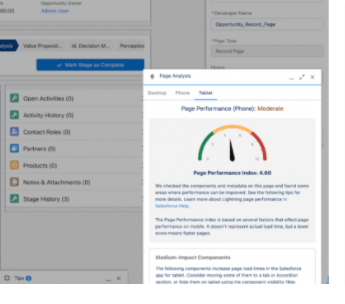
    Users can often experience issues with Lightning experience pages load times. Within this article we explain how Salesforce® Lightning pages work and issues affecting these pages.

    Within Salesforce® Classic, web pages are generated via the Salesforce Instance and then displayed on a user’s desktop or mobile device.

    Salesforce® Lightning pages work in a different way, they are loaded component by component. These components can contain subcomponents adding to the complexity of measurement of finished load times.

    Lightning pages are sensitive to a user’s browser or device. It is important to ensure that a user’s browser is kept up to date, unused browser plugins or extensions are disabled and supported browsers for Salesforce Lightning are used – click here for further information, or contact us for help.

    Complex Lightning pages with a large volume of custom fields, components, visual force pages and customisations can adversely affect EPT – Experience Page Time.

    Other factors impacting Lightning pages include devices that don’t have sufficient processing power, memory and resources.

    Salesforce Administrators/Developers have a number of tools at their disposal to measure the efficiency of Lightning Pages:

    1. Lightning Usage App which can be obtained via the App Launcher in Salesforce

    Further information can be found here.

    1. Use of The Salesforce Lightning Inspector, a Google Chrome DevTools extension. This is a deep dive inspection app providing information to understand sequence events and firing link here Salesforce Lightning Inspector Chrome Extension
    1. Further Salesforce tools which have been extended to mobile pages in the Spring 22 release, are the performance guide for lightning pages viewable in page setup.

    Salesforce recommends the following best practices for configuring Lightning Pages, to name a few:

    • Reduce large number of fields and custom components
    • Complex page configurations
    • Heavy impact related lists with multiple object relationships
    • Optimisation of visual force pages

    For more information click onto the Trailhead Badge – Lightning Experience Performance

    Or Salesforce Help – click here

    If you are suffering with performance issues and page load times on your Salesforce® instance please drop us a line, we are happy to discuss how our talented development team can solve your problems and give your performance a tune up!

    Source: Salesforce

  • Back up your Salesforce© CRM with Performa

    Back up your Salesforce© CRM with Performa

    We believe that people do things for the best of intentions and let’s be honest mistakes do happen from time to time. This could be in the form of a user carrying out a mass update or changing a simple Salesforce© picklist value which has a knock on effect throughout the system. To get data or the original configuration to its prior state could be a potential nightmare if you haven’t got the right processes in place.

    Here at Performa IT we strongly recommend having a backup strategy in place, this drastically reduces risk and also wins you brownie points with your Quality & IT managers, what could be better than that!

    There are two forms of backup for a Salesforce system, namely:

    Metadata is the nuts and bolts of Salesforce e.g. Apex code, page layouts, assignment rules, approval processes.

    Data, this is the records that are held in Salesforce e.g. Accounts, Contacts, Leads and the very important Opportunities.

    There are a number of options to carry out backups, for example;

    Salesforce Data Export

    Extracting data via Dataloader I/O

    Downloading reports from Salesforce

    Or an Appexchange product

    All of which have their advantages and disadvantages.

    Here are some questions below to give you a flavour of what you need to consider!

    • What is the cost in time and money to your organisation if you had to reinstall that data?
    • Is taking a weekly or monthly backup sufficient?
    • What is your retention period for keeping data?
    • How would you comply with a right to be forgotten request?
    • How would you know if a downloaded report or extract has become corrupted?

    As a Registered Salesforce Partner we have a number of options to suit your organisation and budget. If you would like to find out more please contact us today, our team will be happy to assist you.

    Please take note, not having an adequate backup process in place could prove to be incredibly costly, it is your responsibility.

  • Process Efficiency – 5 Critical Elements to Consider

    Process Efficiency – 5 Critical Elements to Consider

    Do you glaze over when conversations turn to improving efficiency? Do you even know what efficiency really means in the context of business processes?

    Organisations know that employee efficiency is one the solutions to productivity and ultimately, this is the reason behind significant investments in applications software.

    In theory, deploying a contemporary software solution like Salesforce® along with sufficient, appropriate user training should result in an outcome where employee productivity is increased.

    So far so good. Where can and where does this go wrong?

    1. The Requirement-Solution Gap. Although many organisations believe that a one-size-fits-all application will deliver efficiency, this isn’t always the case. Efficiency will depend on the “fit” of the application software solution with an organisation’s specific and often unique process requirements. SaaS applications can be more closely aligned to requirements using configuration and customisation. But there will always be gaps that need to be bridged by user’s awareness and ability to manage these mismatches.
    1. Organisational readiness. Some organisations operate more dynamic markets, others may have significant changes imposed on them as a result of changing external market forces or through being acquired. Other organisations slowly evolve their processes over time. This conditioning to change, influences the readiness of the organisation and their experience of managing a roll out of a new system.
    1. Employee’s ability to change. There are many reasons why this can be a problem. Some users are simply reluctant to change, others find training sub-optimal for their style of learning and others underestimate the level of commitment needed to adopt new applications software.
    1. Broken Processes. Some business processes are so poor, they can be described as broken. Employees are obliged to keep these processes working through their innate knowledge, often ignoring policy and making compromises. Generally, these situations are unsustainable and are disastrous from an efficiency perspective.
    1. Continuous monitoring and improvement. Improving efficiency must be viewed as continuous project as business processes are influenced by external factors that force changes over time. It’s important that frequently executed processes and their associated paths through application software are continuously and systematically monitored. An adage applies, “if you can’t measure it, you can’t manage it”. As well as the all-important baseline, real-world measurement for a task, continuous monitoring reveals unforeseen bottlenecks, outliers and exceptions.

    What’s the solution?

    • Understand all nuances in the target processes and identify gaps between these and the standard software solution. Formally select configuration options, develop customisations and agree any process changes that may be needed to make a good fit.
    • Mitigate any shortfall in the organisation’s readiness. In addition to experience and expertise in managing change and delivering solutions, it’s vital to understand and quantify their commitment to the success of the new application. Stakeholder roles such as Program Manager, Business Analysts, Project Managers, Learning and Development as well as Employee Engagement have critical inputs and goals that must be aligned.
    • Employees and Change. Work with Learning & Development groups to ensure that training, help and guidance needs are addressed comprehensively. Traditional up-front training should be supplemented with on-demand training “snippets”, and these can and should be accessible from within the target application. Relevant extracts from Standard Operating Procedure manuals should also be incorporated into the on-demand help and guidance set. Any areas of UI ambiguity should be eradicated by deploying context sensitive help and guidance. Finally, if tasks can be automated then do it. Employee’s motivation, energy and morale is sapped if obvious short-cuts can be automated by the application software.
    • Broken Processes. A simple rule applies here: don’t proceed until there’s a plan to fix broken processes. New applications cannot be delivered onto inadequate foundations. Once processes are fixed or created from scratch, these can be mapped into the application’s capabilities in the same way as other processes.

    Contemporary SaaS solutions include extensive configuration and customisation options which deliver however there are often aspects that may need additional attention.

    Specifically, standard help and guidance typically cover the standard application. Data verification and workflow are key areas that can make a huge impact.

    Deploying Software Adoption solutions such as Apty can complement customisation and configuration strategies and shorten implementation times. Apty supports a broader range of help and guidance deliverables as well as “deep-dive” Application Usage Analysis that can help you baseline the time and steps required to perform specific tasks and processes. Once these are established, Apty includes a range of solutions to address any issues and supports a continuous improvement approach.

    In short, good Software Adoption is critical to Process Efficiency and Employee productivity. Although it’s often overlooked, accelerating applications adoption and user proficiency is one of the keys to successful projects.

    Performa IT are experts in delivering Digital Transformation solutions built on Salesforce. Our solutions are predicated on user efficiency and productivity improvements. Contact us to discuss how we can help your business processes to become more efficient and help make your employees more productive.

  • How to add Lightning Login to your Salesforce Account

    How to add Lightning Login to your Salesforce Account

    After the winter 17 Salesforce release Salesforce introduced Lightning Login, which works in both classic and lightning for Salesforce. Lightning Login saves time, is easy for users and increases security – a win win!

    With Lightning Login after you open the Salesforce URL login page, a user will click/enter their username and then tap to approve from their mobile device.

    Lightning login must be activated within the Session Setup in Salesforce and Administrators can control who has access by checking the box ‘Allow only for users with the Lightning Login User Permission .

    Once this has been completed in Setup then Administrators can hand over to users to work through the following instructions:-

    Instructions on how to add Lightning Login

    1. Before starting this process install the Salesforce authenticator app on your phone via the app store.
    2. Login to Salesforce on your computer
    3. Navigate to your personal settings
    4. Click on Advanced user details
    5. Scroll down the page to Lightning login and click Enroll.
    1. Once the Enroll button has been clicked the enroll process will start, click on the button ‘Register’ button as shown in the picture below, Salesforce will then send a verification code. Copy this from your email and enter into the authenticator app in your phone.
    1. Click on add a New Account in the Authenticator app on your mobile phone, copy the two word phrase as shown in the picture below and click the ‘Connect’ button.

    Salesforce will send an email to the user to say that you have enrolled in Lightning login and authenticator app instead of a password.

    In future all users need to do is enter their username and click Login. The authenticator app will then come into play.

    Lightning login can be cancelled at any time by navigating to the personal settings page and clicking cancel.

    The advantage of logging into Salesforce via this route is that passwords do not have to be saved in a web browser.

    If your org sets a multi-factor authentication policy for logins, the Lightning Login method satisfies the requirement for an additional factor beyond a user’s username and passwords. Salesforce does not separately require users with the Multi-Factor Authentication for User Interface Logins permission to provide a second factor.

    Further information can be found here: https://www.salesforce.com/video/1765359/

    https://help.salesforce.com/s/articleView?id=sf.security_ll_enable.htm&type=5

    Version Number1.1
    Date11 August 2021

  • How an implementation partner helps you get the most out of your CRM investment.

    How an implementation partner helps you get the most out of your CRM investment.

    If you’ve already invested in Salesforce, or are considering doing so, then you probably already appreciate how CRM capability is extremely powerful to grow your business.

    You can…

    ✔️Accelerate sales

    ✔️Increase revenue

    ✔️Have a single view of every customer and every interaction

    ✔️Automate tasks and messaging

    …and much more.

    While it may be tempting to try and piece together your own CRM capability with free tools, this has several disadvantages.

    Such as…

    ❌ It distracts you from delivering your core business and serving your customers

    ❌ It eliminates the opportunity for expert guidance and industry knowledge

    ❌ It limits how you might integrate CRM with other business systems that are important to you

    ❌ It brings hidden costs that mount up over time

    If your business is fairly established and entering a period of expansion and growth, it makes sense to build in the right customizations and integrations that will support your ambitions into the future.

    You can quickly realize the benefits of CRM in your business, without the headaches, by working with an implementation partner who will bring the skills, scalability, strategic thinking and solutions to suit your needs.

    What tools do you need?

    Spreadsheets and free CRM tools may be OK in a small business.

    But as soon as your business begins to expand and your team grows, spreadsheets and CRM tools that are not integrated properly quickly become unfit for purpose.

    Data is duplicated, scattered, or siloed. Processes are ‘Heath Robinson’ at best according to the limitations of the tools. And in amongst it all, security is compromised.

    Sorting out these problems on your own can take an inordinate amount of time that would be better spent focusing on running your growing business.

    An implementation partner will typically carry out an assessment of your current environment and processes and offer some recommendations about how to migrate from spreadsheets and apps to a more integrated and secure environment.

    You can then be guided to the tools that are the right fit for your business, as well as reengineering processes to be more streamlined and fit for purpose.

    Integrations can be set up to eliminate data duplication, and security issues can just be handled.

    Customer Experience

    Ribeye is a British manufacturer of Rigid Inflatable Boats and high-spec Super-yacht Tenders. They called on Performa IT to help them level up their Salesforce deployment in their manufacturing process.

    Martyn Ruskin Ribeye’s After Sales and Customer Experience Manager says: “The business has grown from a small team of boat builders to a small manufacturer aiming at a top end market.

    “We were moving into a manufacturing world where high-end customers look at the business from every angle – and want to know if we’re as high-end as they are.

    “Our ‘cottage industry’ approach to design and manufacture was unsustainable at this level.”

    By working with a knowledgeable implementation partner Ribeye has gone from making small leisure boats for a small audience, to attracting high ticket business from the super-yacht market at the Monaco Boat Show.

    [Read the full Ribeye Case Study here.]

    What’s involved in implementation?

    For a thorough implementation experience you need your CRM delivery partner to guide you through the following stages:

    ✔️Assessment

    ✔️Specification

    ✔️Customization

    ✔️App Creation

    ✔️Testing and Refining

    ✔️Training

    ✔️Support

    These steps call on a variety of skills, expertise and knowledge that it is difficult to acquire on your own, even with an in-house CRM team.

    Your implementation partner also needs to listen well and engage properly with the business to win hearts and minds and drive adoption. Once you’ve made the investment you want to make sure the business drives value from it – and this can only happen if people use it!

    Customer Experience

    British grant-awarding body Energy Systems Catapult engaged Performa IT to resolve information duplication and process inefficiencies. Charlotte Adkins, ESC’s Commercial Support Officer says: “Whenever we have a new requirement Performa IT attend meetings with the users to understand what they wish to achieve.

    “They engage with the business all the way through the development process and help with training in new functionality.

    “Everyone in ESC is aware of Performa IT and what they do for us, and this helps ensure good engagement from the teams.”

    How to get up and running

    Your chosen implementation partner will help you get up and running quickly, whether you need a basic installation of the Salesforce CRM or a more sophisticated strategic approach.

    Giving you direct access to consultants, developers and administrators, your implementation partner seamlessly steps into your environment and becomes part of your team.

    No matter what your entry level with Salesforce you can count on commercially aware, jargon-free advice and guidance that is tailored to your requirements and takes the long view of how CRM fits into your operation.

    Here at Performa IT we offer a “Right Start” service to ensure you are investing in the right tools at the right level to maximise the value and potential of Salesforce for your business. This will get you off on the right foot, enabling you to control costs and accelerate investment return.

    Customer Experience

    Describing his experience of CRM implementation with Performa IT, Stewart Boraston, IT Manager of Property Services company Veritas, says: “The team helped initially in road mapping where we wanted to get to. They took a close look at our existing set up and quickly got to know and understand how we operate.

    “As developers Performa IT work in a very agile manner, quickly translating business requirements into system functions that are very test-driven.

    “This means that we got moving quickly and didn’t get bogged down in traditional waterfall releases which might no longer satisfy shifting business requirements.”

    [Read the full Veritas Case Study here.]

    Talk to us today to discuss your implementation needs. We can help determine the best way to get you up and running with the world’s most powerful and successful CRM tool.

  • Why Hire A Salesforce Consultancy?

    Why Hire A Salesforce Consultancy?

    1999 :Salesforce founded as the one of first “born on the Cloud” software application. It offered just Sales Force Automation.

    2021: Salesforce consistently ranked as the worlds leading CRM application. Offering a vast range of highly configurable functionality, platform tools and integration capabilities. Combined with a free, comprehensive Trailhead training and a vibrant Community. But this also means that, as with any other big IT system you can create a software disaster. Just now even faster than ever. If you are not careful early quick wins can be replaced by ever harder and more costly development efforts. And misdirected questions about the wisdom of opting for Salesforce.

    This is why a good Salesforce Consultancy is worth many times it’s cost. And if you want to get Salesforce right and also get on with IT – Read on.

    Hiring a Salesforce Consultancy

    Hiring a Salesforce consultancy will not only enable you direct access to scarce Salesforce platform skills and experience. But will help you to build a ready to scale solution when you need it. As well as a pool of resources when you need them. You can also rely on our Salesforce consultancy to give you honest, objective and informed advice on what is increasingly a strategic CRM system and also a wider IT platform.

    You may well have an internal Salesforce admin team. A Salesforce consultancy can definitely help them to. By using their extensive knowledge of Salesforce across many different Orgs not just yours. By offering training to your staff. And providing leave and other absence cover. You can rest assured that your Salesforce system is always in good hands.

    It could be that you have a highly capable Salesforce Administrator on your payroll but they may not be familiar with or capable of APEX coding or integrations works. Again we can work with them to help deliver complex projects blending our skills with your in house resources. If you do have good in-house Salesforce technical experts. Are their skills are in a lot of demand? You may want to think about what you would do if they were to leave.

    So why Performa IT?

    Performa IT exists to provide all of the above, honed over the last ten years alongside Salesforce’s own extraordinary trajectory. We offer you direct access to our Salesforce Administrators, Consultants & Developers. With bespoke solutions to maximise the return on your CRM systems investment. Enabling you and your business not only to increase short term efficiency and revenue, but also to underpin your future CRM vision and roadmap. With our large permanent team you can be assured of consistency when relying on Performa ITs resources. We ensure there’s no requirement on your part to train new contractors. Who may come and go, which can often be the case with larger consultancies.

    We are an longstanding Salesforce Consultancy, with equally longstanding client relationships. Our team have over 10 year’s experience of Salesforce, across many verticals, sizes of client and projects. We have the capacity to deliver any size project from a 30 minute fix to a 100 + day projects. From basic configuration to complex code. Our team always aim to deliver elegantly designed solutions with both speed and quality. We also pride ourselves on our personable approach and will always take the time to get to know you, your team, your business, its processes and goals. And of course your Salesforce Org (s).

    With our deep knowledge and experience we have learnt that a ‘one size fits all’ approach does not work. Especially when it comes to the Salesforce platform. Which is why we tailor our offering specifically to each client depending on their needs and plans. By using our consultancy services you can be reassured that we will be there for you, over the whole lifespan of your Salesforce Org… There is no substitute for knowing your Org & business intimately.

    OK – How much is it?

    We are always extremely competitive with our pricing and are mostly more cost effective than hiring in house teams. How do we do that? By having both a core team of Certified Salesforce Admins, Developers and Consultants. Combined with a high quality, committed, equally well certified eco-system built up over years. And direct access also means no indirect costs to recover!

    Can we help you optimise IT? Get in touch with us here.